HELLO, WELCOME TO OUR NEW WEBSITE, ANY QUERIES CALL US ON (08) 9240 7066 OR EMAIL [email protected] - EXISTING MEMBERS WILL NEED TO RESET THEIR PASSWORD ON FIRST LOG IN - THANK YOU!
ERGOLINK IS AN NDIS REGISTERED SUPPLIER & WALGA PREFERRED SUPPLIER
HELLO, WELCOME TO OUR NEW WEBSITE, ANY QUERIES CALL US ON (08) 9240 7066 OR EMAIL [email protected] - EXISTING MEMBERS WILL NEED TO RESET THEIR PASSWORD ON FIRST LOG IN - THANK YOU!
ERGOLINK IS AN NDIS REGISTERED SUPPLIER & WALGA PREFERRED SUPPLIER
HELLO, WELCOME TO OUR NEW WEBSITE, ANY QUERIES CALL US ON (08) 9240 7066 OR EMAIL [email protected] - EXISTING MEMBERS WILL NEED TO RESET THEIR PASSWORD ON FIRST LOG IN - THANK YOU!
ERGOLINK IS AN NDIS REGISTERED SUPPLIER & WALGA PREFERRED SUPPLIER
HELLO, WELCOME TO OUR NEW WEBSITE, ANY QUERIES CALL US ON (08) 9240 7066 OR EMAIL [email protected] - EXISTING MEMBERS WILL NEED TO RESET THEIR PASSWORD ON FIRST LOG IN - THANK YOU!
ERGOLINK IS AN NDIS REGISTERED SUPPLIER & WALGA PREFERRED SUPPLIER
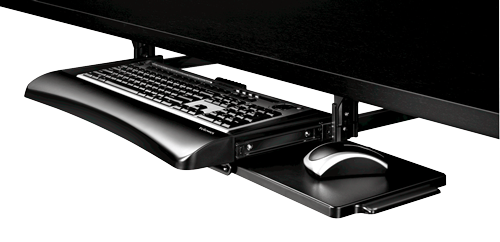
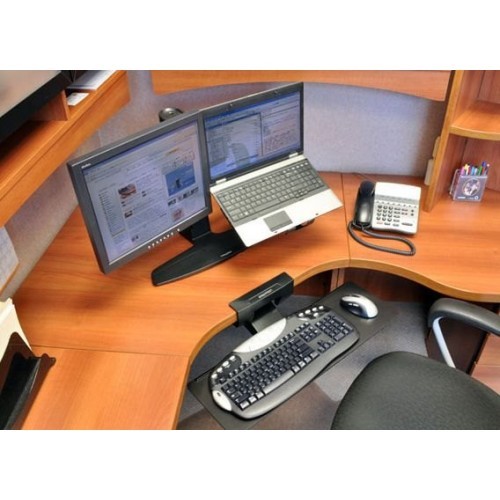
Our range of keyboard trays and supports are designed to improve your comfort during your computer use and help declutter your workstation. The tray help with your productivity as it frees up your desk with more space. A keyboard tray is easily installed by attaching underneath the desk with a clamp.
If you would like to try out our range of Keyboard Trays and Supports before buying we welcome you to visit our Perth showroom and speak to one of our trusted experts. Or, shop online – we can deliver to anywhere in Australia.
A keyboard tray isn’t necessary for everyone, but it’s highly recommended for office workers who work in a busy environment. An under desk keyboard tray frees up your desk for important documents, and other electronic devices. It also streamlines your work station by allowing you to easily store your keyboard on the platform under your desk when it’s not being used.
The Ergotron Neoflex Keyboard Support is a great example of an ergonomic keyboard support that can quickly extend and detract from underneath your desk. An under desk keyboard tray is also recommended if your workstation is small and you don’t have a lot of desk space for other tasks.
Your hands should be similarly positioned as if you were normally using a keyboard. A keyboard tray is only designed to provide an additional work space with extra adjustable options, your hand positioning should not be affected. The main thing to focus on is keeping your hands in a neutral, relaxed position. If your hands are aching or getting sore after long periods of keyboard use, you might need to use a wrist support. A wrist support keeps your hands raised off the hard table and helps to keep your hands hovering just above your keyboard in a comfortable position.
If you work in an office job that requires heavy computer use, your hands and wrists can become tired by the end of the day. We’ve compiled a few easy tips that will help you comfortably work at your keyboard for longer periods of time:
1. Make sure your feet are positioned properly on the floor to provide you with good balance. Sitting on one leg, or slouching in your chair can drastically affect your posture and overall comfort.
2. Keep the centre of your body aligned with the “H” key and correctly position your elbows to the side.
3. Ensure you are sitting up straight in your office chair and that your keyboard is comfortably positioned away from your body (between 40 – 60cm).
4. Try to relax your hands when possible. If you’re not typing, rest your hands on the sides of the keyboard and make sure you aren’t keeping them tense.
5. Try not to use a laptop keyboard. These keyboards are often reduced in size and make it difficult for your hands to be kept in a neutral position. Laptop keyboards also make your wrists turn in more than they should, which can lead to carpal tunnel syndrome. If you have to use a laptop for work, we recommend using an external keyboard.